Java - Output
Exercises
Practice Poem
Difficulty: Low
Title: Practice Poem
Description:
Look up a poem (at least 6 lines long) and print out the poem in quotation marks and indent / tab every other line.
Output:
"Roses are red"
"Violets are blue"
"I love Fridays"
"How about you?"
Bingo Rules
Difficulty: Low
Title: Bingo Rules
Description:
Create a BingoRules application that displays the rules for playing bingo. Place each rule on a separate line and place a blank line between rules. First line will say Bingo Rules tabbed in, followed by 5 rules of bingo double spaced.
Output:
Bingo Rules
1. The caller randomly pulls a numbered bingo ball.
2. The number is placed on the bingo board and called out.
3. Players look for the called number on their bingo card.
4. If the number is located, it is marked off.
5. Steps 1 to 4 are repeated until a player matches the BINGO pattern.
6. The winning player yells BINGO.
Bingo Card
Difficulty: Low
Title: Bingo Card
Description:
Create a BingoCard application that displays a traditional bingo card with five columns of five unique numbers.
NOTE: For the Bingo Card you need to use the Format Method.
- The column labels are B, I, N, G, and O.
- Column B contains numbers ranging from 1 through 15
- Column I has numbers ranging from 16 through 30
- Column N has four numbers ranging from 31 through 45 and a Free Space in the middle of the column
- Column G has numbers ranging from 46 through 60
- Column O has numbers ranging from 61 through 75
Format() Method
The format() method can be used in place of the print() or println() methods to control the way output is displayed. The format() method arguments include a format string and an argument list. The format string contains specifiers that indicate how the corresponding strings in the argument list should be displayed. The following code demonstrates the format() method:
System.out.format("%-10s %8s %8s", "Team", "Wins", "Losses\n");

System.out.format("%-10s %8s %8s", "Jaguars", "10", "5\n");

System.out.format("%-10s %8s %8s", "Cheetahs", "14", "1\n");

System.out.format("%-10s %8s %8s", "Panthers", "8", "7\n");

System.out.format("%-10s %8s %8s", "Penguins", "4", "11\n");
Output: 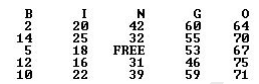
Shapes
Difficulty: Low
Title: Shapes
Description:
Create a Shape application that displays two shapes of asterisks (*). The two shapes should be at least 15 asterisks wide and 7 asterisks high using at least 2 escape sequences.
Output: 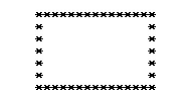
Smile
Difficulty: Low
Title: Smile
Description:
Create a Smile application that displays a smiling face made of keyboard characters.
Output:
Here is an example output, but be creative with your face (If you have the time make a body/ arms/ legs for your smile face).

Your Initials
Difficulty: Low
Title: Your Initials
Description:
Write a Java program to display your initials for your first name, middle name, and last name (ex. CEB). Use the letters in your initials to form each letter of your initials, for example see how JAVA is spelled in the following pattern with 'J' for the letter J, 'a' for the letter a, and etc.
Output: